Use Cases - Definition (Requirements Management Basics)
By Michael Shrivathsan on Sep 19, 2009 in Requirements Management Basics, Use Cases
A question that frequently comes up in my conversations nowadays is:
What exactly is a Use Case?
Let me try and explain it in this short blog post.
What is a Use Case?
Based on a couple of my favorite books on requirements, “Software Requirements,” by Karl Wiegers and “Writing Effective Use Cases,” by Alistair Cockburn - I’d define it as follows:
A use case is a series of related interactions between a user (or more generally, an “actor”) and a system that enables the user to achieve a goal.
To phrase this definition in another way, a use case describes the system’s behavior as it responds to a series of related requests from an actor.
Use cases are perhaps the best way to capture functional requirements of a system.
An Example
Here’s an example to help you get a more tangible feel. Let’s say you’re designing a Human Resources software used to keep track of employee information at your company.
For such a project, here’s a simplified example of a use case titled “Add an employee”:
Add an employee:
|
As you can see above, each of the steps is sequentially numbered. Each sentence begins with a noun - such as “user” or “system”. This noun is followed by a verb - such as “selects”, “displays”, “enters”, etc.
As well, note how the title of the use case is written as a short, active verb phrase that defines the goal of the use case.
There is much more to the art & science of writing effective use cases - I’ll cover them in future posts.
What is NOT a Use Case?
Sometimes you may hear people refer to UML Diagrams as use cases - these are the diagrams composed of cute stick figures and ellipses as shown below.
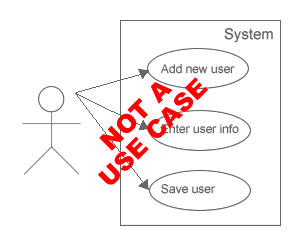
Don’t be fooled. If these are use cases, then I’m Brad Pitt - i.e. not even close!
As Cockburn says in his book (emphasis his):
For reasons that remain a mystery to me, many people have focused on the stick figures and ellipses in use case writing…and have neglected to notice that use cases are fundamentally a text form…
Whatever the reasons, we now have a situation in which many people think that the ellipses are the use cases, even though they convey very little information…
The UML diagram… is not a notation for capturing use cases.
I think UML diagrams are mostly a giant waste of time and of very little practical use to any of the important stakeholders such as end users, engineers, and business executives. The only possible use I can imagine is as “Table of Contents” for text-based use case documents - but even for that, there’s a far better text-based approach. But that’s a topic for another day and another post.
Please chime in with your thoughts or perhaps an even better definition - click here to post your comment…

1. George | Sep 20, 2009 | Reply
ya, i agree with u, i do not like UML Diagrams as use cases
2. Stewart Rogers | Sep 21, 2009 | Reply
Good post! I tend to prefer use scenarios over use cases, but it depends on your writing style. I did a blog post awhile back, that I reposted here:
http://www.strategicproductmanager.com/2009/09/21/repost-use-cases-vs-user-scenarios
Stewart
3. Philip Haine | Sep 26, 2009 | Reply
Michael, I’m confused about something.
Alastair Cockburn says:
“Use cases should not be used to describe UI designs for several reasons [..]First, a use case is normally intended as a requirements document, and the UI design is a design created by trained people after being told what the system should do. Secondly, UI design is brittle, changing often. Writing the UI design within use cases means the document will have to be updated frequently, much more often than a requirements document ought to be”
and also:
“The two most common and most costly to the project are including too many details and including UI specifics.”
Yet the “add an employee” example you give prescribes a specific UI approach (menu choice, a screen for adding an employee, etc). There are of course many alternate UI approaches to fulfill the requirement to add an employee.
If a use case is supposed to be a requirement, shouldn’t it stay away from prescribing a design approach?
4. Jeff Trompeter | Sep 27, 2009 | Reply
In the book “Seven Steps to Mastering Business Analysis” by Barbara Carkenord, page 241, there is a use case diagram. The book states “Use cases are depicted as ovals and actors as stick people”. This is the opposite of what you are saying. Who is right?
5. Philip Haine | Sep 27, 2009 | Reply
Jeff, I think the distinction is between use case, and use case diagram.
Also the two ideas have, near as I can tell, different genealogy. Use case diagrams come from the RUP (Rational Unified Process) world, which is, at this point, somewhat antiquated and discredited due to its onerous documentation requirements.
The new Extreme Programming (XP) world which matured into what’s today’s Agile approaches were driven by Beck, Cockburn and others, in part to streamline processes. “Use cases” (not the diagrams) came from this camp.
To make matters worse, in casual usage, a use case is simply that, a case of use of a system. You could say, “Oh the system has to account for the use case of someone adding an employee” and nobody would call you on it, even though that intuitive use is at odds with the official definition Michael cites.
It’s no wonder people are perpetually confused about use cases.
Philip Haine
productvision.org
6. Michael Shrivathsan | Sep 28, 2009 | Reply
Jeff - Good question. I agree with Mr. Cockburn. I find use case diagrams (ovals & stick figures) to be of little use in real world - so do most readers of requirements docs I’ve talked with.
My recommendation is to forget about the ovals/stick-figures approach. As I said towards the end of my post, I find them to be a giant waste of time.
To call those diagrams “use cases” is grossly incorrect, even when otherwise good books do it.
7. Michael Shrivathsan | Sep 28, 2009 | Reply
Philip - Re #3, Very astute observation!
Cockburn indeed says that. Most requirements “purists” say that too. That is the “widely accepted” theory.
Yet - at a significant majority of the companies I’ve seen, the requirements docs and UI docs refer to each other liberally, and are often intermingled.
I believe the “purist” thinking from the “old school” says - lets define all the requirements and build the app first, then slap on a UI at the end. So, don’t put any UI stuff into reqs.
I think that’s the wrong way. I believe it’s totally okay (and better) to include some definition of UI into requirements docs. Such as the one I showed in the example above.
That said - I agree there’s more than one “right” way here, just like most things in business. As such, I understand & respect folks who have the opposite view on this - although I disagree with them.
8. Philip Haine | Sep 30, 2009 | Reply
Maybe I’m more of an “old school purist,” but I think it’s extremely important for product managers to get in the habit of separating problem definition from solution.
The key reason is that the first attempt at a solution is rarely the best that one can come up with. If a solution is presumed by the requirements, improvements to it have now become an issue that needs to be reopened by whoever has a bigger idea. It’s much easier for downstream folks to just keep their heads down and just follow the letter of the requirements. And it makes responsibility for quality not their problem.
The real art in requirements writing is not in expressing the solution, but in effectively communicating the problem to be solved to the downstream people who must make sense of it.
It’s more important to get across the spirit of what is to be achieved than the letter.
That’s why I’m always encouraging product managers to think more deeply about the scenarios that beget the requirements, and the “why” behind them. If a product manager can attain and spread this degree of customer empathy to the designers, and engineers, docs, QA people and marketing groups, then everyone will have the right mindset when doing their job. The solutions can hit the spirit of the requirement, not just the letter.
(When you see features that nobody can satisfactorily explain, that are clunky to use and marketed wrongly, you know that they didn’t truly understand the “why”.)
This is why I’m always touting the SSNiFs process, which is designed to capture the spirit of a requirement or user research finding.
All this said, I’m not such a purist after all. The “F” in SSNiF stands for “(potential) Feature” after all. The pragmatic idea is that if a researcher or product manager has a specific feature in mind, they should not play charades and talk around it, but go ahead and uncork that tension and express it in the “(potential) Feature” column. Yet calling it “potential” feature establishes that this is just the current best thinking of the solution, and that the clients of the requirements document are encouraged to do better, without having to overcome the inertia of a presumed solution.
The SSN (Stakeholder, Situation and Need) in SSNiF is the statement of the problem — the requirement. And it’s cleanly separated from the solution, the potential Feature. If anyone can come up with a better F to satisfy the scenario (SSN), then it’s welcome.
Is there more than one “right” way? I think so, depending on the context.
For custom, internal programming jobs where the budgets are small, where the customer base is twenty people in the same office, such groups can and should cut corners as needed. With respect to requirements, that could even mean transcribing the UI that the one customer wants and giving it to them, because the customer (singular) will be happy and sign off on it.
But for commercial product the bar is much, much higher. If we don’t have processes that enable higher standards we’re toast, and a competitor will butter and eat us. For the sake of competitiveness, we need the best practices we can find.
Philip Haine
productvision.com
9. Philip Haine | Sep 30, 2009 | Reply
Incidentally Michael, you said something that confused me:
** I believe the “purist” thinking from the “old school” says - lets define all the requirements and build the app first, then slap on a UI at the end. So, don’t put any UI stuff into reqs. **
This seems like a strawman to me. The alternative to putting presuming solutions in the requirements docs is not to “build the app first, then slap on a UI at the end”.
It’s designing the best solution possible based on the requirements (which should be based on user scenarios), then building out that solution.
This allows the product manager to do what s/he does best and the designer to focus on his/her speciality too.
That’s the old school approach, and the new school approach too!
Philip Haine
productvision.com
10. Scott Sehlhorst | Sep 30, 2009 | Reply
Hey Michael, unfortunately, you’ll have to add me to the list of people you disagree with about use cases. At least until I can convince you otherwise.
Over the years, Roger Cauvin has convinced me to change my mind on stuff, so I know it’s possible
1) I think it is very bad to include UI cues in your use cases. I talked about it a bit here:
http://tynerblain.com/blog/2005/12/23/top-five-use-case-blunders/
and other mistakes here: http://tynerblain.com/blog/2006/01/26/top-ten-use-case-mistakes/
2) I agree with you on the worthlessness of UML Use Case diagrams (other UML diagrams can be extremely valuable, just not the use case ones): http://tynerblain.com/blog/2005/12/26/use-case-series-uml-20-use-case-diagrams/
3) You also need to worry about embedding business rules inside use cases (just as bad as implementation constraints, but for different reasons): http://tynerblain.com/blog/2007/09/03/business-rules-and-use-cases/
I’m a big fan of use cases (and user stories), because they allow a team to maintain a user-centric approach to solving real problems. However, I believe that embedding the “user experience” with the “problem definition” can lead to problems. Primarily because most product managers (and business analysts) are not UX experts. I’ll pick on your example - would the solution the engineering team creates be acceptable if it used a keystroke or button instead of a menu item to initiate the “Add employee” step? If a lightbox appeared on the screen (or data-input fields appeared via a window-blind insert), would that still be acceptable?
The use case should be unambiguous in terms of what must be accomplished, and it should be unambiguous in terms of defining the acceptance criteria. Anything that is created that meets those criteria is acceptable.
This is definitely a roles & responsibilities issue - someone will design the user interface. That person establishes additional constraints on, or prescribes an approach to, achieving the goals. It may be, as the person who is writing the use case, that you also happen to be the person designing the user interface - I’ve been in that position - but usually that is not the case. A combination of wire frames and story-boards (to express design ideas) with use cases (to express requirements) is better than embedding design cues into the requirements.
Scott
@sehlhorst (on Twitter)
11. Patrick Masi | Sep 30, 2009 | Reply
From Scott:
“The use case should be unambiguous in terms of what must be accomplished, and it should be unambiguous in terms of defining the acceptance criteria. Anything that is created that meets those criteria is acceptable.”
Note what word Scott didn’t use here - “user”! I believe there’s a reason for that. The inherent issue with any use case that starts with language such as “user selects” is that it automatically presumes a user has to be present to accomplish the goal. What if that exact same information could have been retrieved via web service? What if it was already available in another subsystem that you haven’t discovered yet?
Phrasing use cases in such a way that dictates a designed method for accomplishing them gets everyone on the project thinking a certain way, believing that certain constraints must be true, and those constraints can actually obstruct team members from thinking about a problem creatively.
Patrick (@pjmasi on Twitter)
12. Roger L. Cauvin | Sep 30, 2009 | Reply
I have written a number of blog entries on the issues surrounding use cases. Here is a summary of my views:
1. The steps in a use case are interaction design, not requirements. The order and sequence of interactions between users and the system are themselves design decisions best made by interaction designers, not product managers.
2. One very effective way of capturing requirements (both functional and nonfunctional) is black box use cases. With black box use cases, you don’t just treat the system as a black box, but the use case itself.
3. Don’t even try to bring up the old saw about essential and real use cases.
4. Use case diagrams are a fine way of very quickly capturing and communicating the functional requirements, as the names of use cases represent functional requirements, and the steps in use cases do not.
13. Robin Zaragoza | Oct 1, 2009 | Reply
I don’t know Michael, nor do I know his work history, but I think its worth pointing out that he currently works at a startup.
I too am a startup girl, and most of the time, I’m somewhere that just can’t afford “the luxury” (I say this with irony) of a real UX person. Because we are the expert on the needs of the market, we are usually also the best one to define a good user experience. There are a ton of people more qualified than me to do this job, but they don’t work where I work - I’m the best my company’s got. I guarantee if I leave it to engineering, it will be worse.
With that said, I still agree with the fundamental separation folks are pointing out - a use case *should not* imply user interaction. The point of a use case is to help those building the solution to understand what should be accomplished, with what criteria. They are then appropriately informed to make decisions about the solution (because lets remember, they are making lots of decisions about the back end as well, not just the front end). If you don’t give them that background, they will build a very narrow solution based on your step by step description of the UI.
Once that use case is described, however, I think its perfectly reasonable to then describe the interaction, if you’re the best one to do so (I call these user stories). If you actually have a UX designer, then you can be sure he doesn’t want to be told how to do his job and thus use cases are the best form of communication with them as well.
14. Scott Sehlhorst | Oct 1, 2009 | Reply
Hey Robin, I completely agree with your perspective, I just believe there’s a ‘better way’ in terms of the artifacts. Roger touched on this with his ‘black box’ article (point #2).
FTR, While I don’t know Michael personally, his insights and writing on product management (combined with the dearth of other blogger/author/thought-leaders writing in 2005) inspired me to start the Tyner Blain blog (and to work harder at it to ‘clear the bar’ that Michael set for quality, clarity, and relevance). For me at least this is an opportunity to “change his mind” not an opportunity to “disagree” - I respect his views too much on so many other things.
I had great success in start-up “be the UX guy too” roles by using a combination of user stories, storyboards and wireframes, as the vehicles for communicating with both in-house development and creating RFPs for contracted work.
I may be using “user story” in a different way than you are here. I mean using the format “As a [role], I want to [accomplish something], with [some frequency], so that I [get a benefit / relieve a problem]” - a variation on the format that Mike Cohn suggests. This format is augmented with explicit acceptance criteria that define what will be an acceptable delivery of working software. Anecdotally, there is a continuum of complexity to goals that will make either a user story or a use case a better vehicle for communicating the above - see http://tynerblain.com/blog/2009/02/02/user-stories-and-use-cases/ .
The storyboards are very effective for designing the overall flow of interactions (Roger’s point #1). They also work brilliantly both at communicating context to the engineering teams, and in describing “what you get” to the stakeholders (customers, start-up founders) without getting wrapped around the axle on technology details.
The wireframes provide the IA and layout cues needed to guide development (when they are needed). They are low fidelity (intentionally), and do not define any of the graphic design elements. Have you ever tried presenting a “the product will do this” mock-up to have someone say “those buttons should be blue” or “the logo isn’t big enough” or “that’s not the right masthead” and completely derail your discussion of value? I have. It sucks. That’s when I became a believer in using low-fidelity wireframes (like you can make with Balsamiq) instead of mock-ups done in photoshop or powerpoint or visio.
So I agree with you - when you have to do product management plus UX, do it. Just don’t bake the UX into the “requirements” artifacts.
15. David Locke | Oct 1, 2009 | Reply
OVID is a UX design methodology that is very much a build it and slap a UI on it methodology.
If you put UI details into your requirements, you will be changing your requirements as your technology and its product and service forms change over time. These changes are about “How,” not “What,” so why should they be in the requirements? No, they shouldn’t.
A Model-View-Controller architecture should allow you to change your UI over time with minimal impacts on your requirements. What changes as you move from a C++ installed app to a web-based app should be the view and the controller. You might change the particular database you use, but the model embodied in the database doesn’t need to be revised to achieve task sublimation.
16. theprodmgr | Oct 1, 2009 | Reply
I must be in the minority, because as a Product Manager I am not currently writing Use Cases (or User Stories or User Scenarios). I provide the business requirement, using Michael’s HR system example - “The user must be able to add new employees”.
We have Business Analysts, who are members of the Development group, that are responsible for taking that to the next level - defining the interactions between user and system or between two systems.
What we have tried to do is the following:
1) Not include specific UI paradigms (e.g user selects menu item) in the Use(r) Story/Case/Scenario. However, there are times though when it makes sense to have some semblance of the interaction included. It might look something like:
Step 1: User selects to Add Employee
Step 2: System displays “Add Employee” screen.
Step 3: User enters data
Step 4: User selects to save data
Step 5: System validates and saves data
2) The Use Case diagrams are still being done, but used more to provide a “catalog” of the use cases. I find them useless, however the BA Manager likes them and has imposed that his team use them. Kind of an “old school” approach in a pseudo-Agile Development organization
3) Have separate Wireframes/mock-ups etc. to articulate the UI. We are not a start-up, but still small enough that we cannot afford a UX expert. The Wireframes are validated with internal “experts” in our Services group (who work closely with our customers”, other staff members who come from Industry and with some of our customers as well.
In my past, when I have created Use “Cases”, it was also important for us to include (obviously) the Alternate Flows and Exception Flows. We also started to provide the text for all of the User Messages (Error, Informational, etc.) as opposed to leaving it to a Developer to come up with.
17. theprodmgr | Oct 1, 2009 | Reply
Scott,
I know EXACTLY what you are talking about in the wireframe discussions when it quickly veers off to discussion of button colours and the fact that the fields aren’t lining up.
In a previous life, I was a software Developer. I remember having a meeting with my business sponsor where I wanted to walk him through our prototype to make sure that (a) we captured all of the business requirements/main functionality and (b) to make sure he was happy with the overall flow.
We made it very clear (we thought) that the UI was still being cleaned up - that we would update the colours, logos, ensure things lined up properly etc. after we validated the main flows.
Wouldn’t you know, the first thing he glommed onto was that we weren’t using the right colours, then the buttons weren’t aligned. He couldn’t even focus on whether or not we were capturing the correct info., had an inuitive flow etc. The sad thing was that he was a former developer and should have known better.
18. Gopal Shenoy | Oct 2, 2009 | Reply
I agree with many here that use cases should not define the UI elements. It should instead capture the interactions required to meet the functional requirements.
In the scenario described here, it would be like, user adds a new employee, specifies required information, submits the information, gets a message indicating that the employee has been added. Whether this is done via menus, buttons, checkboxes etc. does not matter.
Mixing UI into functional requirements mixes the problem defintion and solution and this usually ends up in a very long discussions and food fights. After a little while, it is very easy to lose sight of the problem.
The approach that has worked for me is clearly defining the problem, the requirements for a solution and then proposing a UI (with the help of an interaction designer if you have the luxury of one) for the solution.
This helps compartmentalize disagreements:
1) Is the problem statement wrong?
2) Or is it the requirements?
3) Or is it the UI?
This helps reach consensus faster than having all of it in one place.
I totally agree that UML diagrams are useless and a waste of time. I have never used them.
19. SteveWOrr | Oct 2, 2009 | Reply
Whereas it is clearly important to distinguish between a diagram (possibly throw away) and the underlying model that it represents, diagrams (UML or otherwise) definitely have their place, particularly when they are annotated as richly as necessary. I’m not sure if your general condemnation of UML diagrams referred only to use case diagrams or all diagrams, but I have certain ones useful in workshops and others useful in helping me think about complex situations. Of course, they are only a tool, to be used, like any tool, only when they are needed.
Steve
20. Michael Shrivathsan | Oct 4, 2009 | Reply
Wow, I thought my other post was a bit controversial!
Great comments - thanks everyone.
—–
Philip, Scott, Roger, David, Gopal:
Excellent points on the benefits of separating “requirements” from “design” - well said. I know that most existing literature (books, etc) is on your side too.
But here’s the rub - those benefits are not free. They come at a cost. Usually more resources, more rigidity, longer dev cycle, etc.
So the question becomes - are the benefits worth the cost? I agree the answer will depend on context - i.e. company size, target markets, etc.
Part of my perspective comes from first-hand experience at 2 successful software startups. By “successful”, I mean we grew them from tiny startups to more than $100M in revenue, healthy profits, and #1 market share.
At both companies, our requirements and design were intermingled - to a degree that perhaps would completely shock many of you who believe that requirements should be completely separate from design! We did it that way because we found that was the fastest, most-efficient way of getting things done.
If my data is correct, more than 90% of software companies in the US (probably true across the world too) have revenues of less than $100M. So the experience I’ve shared above is applicable to at least 90% of companies in the context of company size (of course, other factors may make them not applicable - I don’t know).
At Accompa, while we haven’t yet hit $100M - we take the same approach of mingling design and requirements, and it works extremely well. In many cases, we actually design the UI before writing the complete set of requirements.
Furthermore, a large number of software companies of all sizes use Accompa software to manage their requirements and create requirements docs. I’ve had the privilege of talking with many of them. What I’ve seen is - a majority of companies write requirements that do NOT separate UI/design from requirements. They’re intermingled liberally. This “empirical evidence” leads me to believe that these software companies also find the benefits of rigid separation not worth the costs.
That said, I respect that there is more than one “right way” of doing things. It’s just that the practical reality (from my limited perspective, mostly pseudo-agile environments) doesn’t match up to the theory that says “thou shalt separate requirements and design”.
21. Michael Shrivathsan | Oct 4, 2009 | Reply
Regarding the point some of you made that “if you mix requirements and design - then requirements cannot be frozen, but must be changed whenever design changes.”
My thought is this.
I don’t believe requirements should be ever frozen. They should be changing whenever there is a need - change control process should accommodate this.
If I sent my use case above to my team, and the UI Designer made a case to change it, I’ll change it. No problems.
The best scenario is - use cases should be written by PM/BA iteratively with input from UI Designers. Then they go to Eng team, along with detailed UI mockups/specs from UI Designers.
—–
@ theprodmgr - Most software companies in silicon valley don’t have BAs, as far as I know - PMs play that role.
22. Michael Shrivathsan | Oct 4, 2009 | Reply
Hey Robin, Scott:
FYI - The following link has some info on my work experience, etc:
http://michael.hightechproductmanagement.com/michael_product_management_product_marketing.html
I hope that helps you get to know me better!
23. Philip Haine | Oct 6, 2009 | Reply
Michael, thanks for your response and congratulations on the success of your businesses!
I don’t think the distinguisher of when best practices should be practiced is the size of the business or the market. It’s whether the quality of the user experience is one of the prime differentiators in that market.
The market may not demand great user experience, at least not yet. If customers are starving, any food will be appreciated. Once their basic needs are met and more restaurants have sprung up, they can and will be more discriminating.
But if you are in a market where user experience is critical… well, you probably already have a luxurious designer on staff, and you are already feeding him or her problem statements, not presumed solutions.
Maybe this whole rich discussion boils down to simply that: if you are acting as both the product manager and the de-facto designer, you might be able to get away with blending requirements and design specs. If you have a separate specialist, then it’s best to divide the responsibilities — and expression — of problem and solution.
Philip Haine
productvision.com
24. fumious-student | Oct 6, 2009 | Reply
Patrick, you posted the following quote and attributed it to Scott:
“The use case should be unambiguous in terms of what must be accomplished, and it should be unambiguous in terms of defining the acceptance criteria. Anything that is created that meets those criteria is acceptable.”
Can I get a more precise citation on the origin of that quote please?
I’m asking because of the shear frustration I’m having with use cases as a new (VERY mature) student doing a brief overview of requirements within a software specification course. Like many others I’m seeing an awful lot of “how” in the examples I’m being shown but I’m being told to look at “what”. (my reaction of course being “What!!!? How!!!?”)
Its almost as if no-one can agree on what a good use case specification even within a well defined SEP…I can’t help but wonder what a bridge would look like if designed using use cases…
I digressed. I asked in regards to the quote because it stuck me that “acceptance criteria” was a darn-gosh-golly-good way of actually ensuring that a requirement had been met (lets articulate and design but hope no-one notices if it doesn’t do what it was supposed to?)…and I would like to subscribe to their newsletter…
25. Mark Kromer | Nov 11, 2009 | Reply
I often see use case referred to business processes that may or may not include human interaction and are often much more complex than UI interactions.
I have evolved my thinking of use cases from the days of UML diagrams, to Michael’s description here, to also now include business processes, often what some may thinking of as BPM diagramming.
Does anyone else see this definition more broadly as well for “use case”?
26. Michael Shrivathsan | Nov 20, 2009 | Reply
Mark - Good point, I agree with you. “Use cases” are not limited to just UI interactions.
27. Luca Candela | Dec 3, 2009 | Reply
I’m not sure the author of this post understands what the Use Case DIAGRAM stands for… Use Cases still need to be described in writing (and that would be the content of the oval, not shown in the diagram) while the diagram represents the relationship between the various use cases.
Without the UML schema to put the use cases in context, you have an humongous list of cases that doesn’t make any sense.
I feel like there’s a lot of ignorance surrounding UML, and this article doesn’t help fixing this problem.
UML is a very good tool for any Agile team and I really don’t get why so many think it bogs down the process: in fact UML speeds up things removing many obstacles to effective communication.
28. diane | Sep 9, 2010 | Reply
The Use Case Model/Diagram is a pictural view of the system boundaries. It identifies the use cases that need to be defined to support the solution. The Use Case Model can quickly (in a single page view) illustrate the scope of the solution.
That is the value of the Use Case Model/Diagram. However, I agree, the Use Case is a narrative conversation between actors designed to elicit and document the functional requirements of the solution.